Google Play Store PC
Gives you access to any type of Apk Android App on your Windows PC.

Safe & Secure
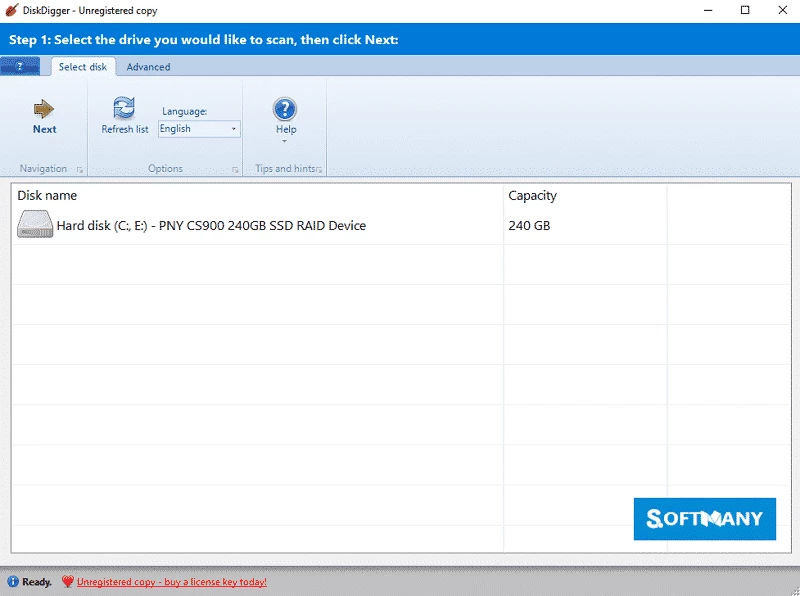


DiskDigger is a powerful and straightforward data recovery tool that enables users to restore their lost photos within a few clicks. The support for multiple storage media, such as USB drives, hard drives, SD cards, and so on, allows users to recover their photos, documents, and any type of content.
Currently, digital devices are used to store all of our important documents, pleasant memories, and a lot of multimedia files. We can use all of our stored content according to our requirements, but by mistake or because of a device crash, we may lose our precious data. It could be a great loss, but now we can compensate for it with the help of data recovery apps such as DiskDigger.
DiskDigger, developed by Defiate Technologies and falling into the Utilities and Tools category, is a simple yet powerful tool used for retrieving your accidentally lost data. It supports multiple file formats to make it easy and simple for you to restore your precious data from hard drives, USB flash drives, memory cards, and even from optical media, including CDs, DVDs, and Floppy Disks.
It supports all file systems, including FAT and NTFS file systems, and reliably ensures data retrieval that has been lost due to formatting, corruption, or any other hardware issue. You can use the portable version, and no need to go for traditional installation.
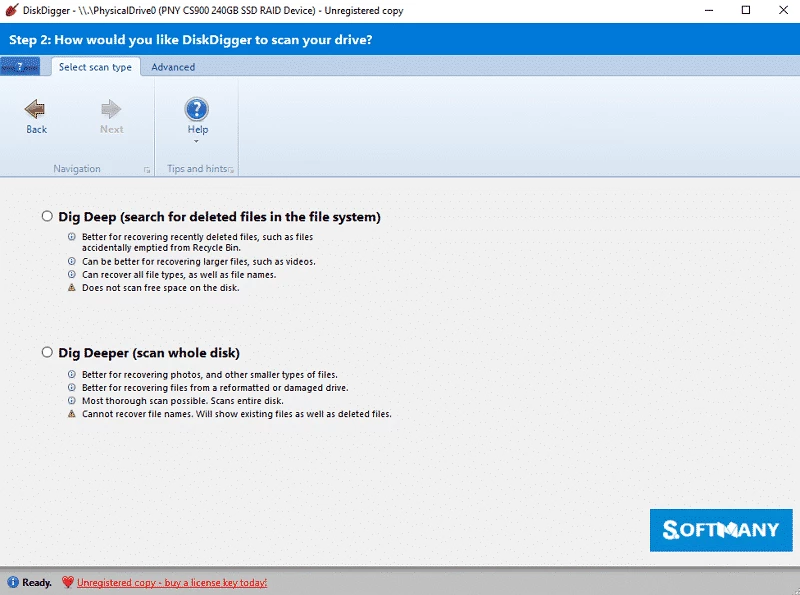
The minimalist interface offers a straightforward procedure for selecting of drive and a recovery mode. So, the interface isn’t modern, but functional and easy to navigate. You will find two types of recovery mode, and start the scanning process. Take a preview of the displayed recoverable files, and select the location for restoring your lost files.
The app is available as a portable application, so you do not need to install the app manually; instead, use an executable device such as a USB or external drive while avoiding the lengthy installation process. So, you can easily rescue your lost data within a few clicks while selecting the path from where you want to recover the images
The flexibility of format choice enables users to recover their lost data from their device hassle-free. The supported formats are DOCX, PDF, ODT (documents), JPG, PNG (images), MP4, REDCODE, R3D (videos), ZIP (archives), and lot of other multimedia formats. Even the app offers support for lesser-known extensions, including WMF, EMF (Windows Metafiles), and OpenDocument types.
The availability of two recovery modes;
After a thorough scan, the tool will display a list of deleted files in a table. Here, all of the details related to deleted data will be displayed, including name, status, size, and creation date. You can preview the data before restoring to make sure you have retrieved the right data. The scanning process will take time, as on to size of the disk, from one minute to a few hours.
As we aforementioned, the time for retrieving data depends upon the size of drive, and the scanning process you have selected. If you select quick scanning, it will work quickly and restore recently deleted data within few minutes. Whereas, deep scanning will be thorough and time-consuming, as it allows retrieving large videos and formatted partitions.
The software is regularly updated with new features and bug-fixing functionality. RED Video Camera files, OpenDocument formats, and Improved file recovery are some recently added updates. The compatibility with FAT12 partitions and international translations is also updated.
The software offers awesome compatibility for multiple digital devices, including Windows 11, Windows 7, Windows 10, Android, macOS, and Linux, along with 32-bit and 64-bit operating systems. In addition, you also retrieve your data from various types of storage, such as hard drives, USB flash drives, memory cards, and also from optical media such as CDs, DVDs, and floppy disks.
Pros
Cons

Gives you access to any type of Apk Android App on your Windows PC.

PC App Store download, install, and keeps up-to-date your PC programs

free emulator to play Android apps on your pc with extra performance, reliability

Bijoy Bayanno the most powerful software to write Bengali language on PC

Media Creation Tool is upgrading and installing Windows 10 bootable installed disks.
Rufus easily change your USB Flash to a bootable ISO flash drives.